
I don’t usually write product release posts on this blog. But I’m making an exception for NetBrain 12.3 for a simple reason: I helped build the launch content for this release, and there are a few things in it that I think are genuinely worth talking about from a practitioner perspective. Not from a product marketing one.
So consider this my personal take. Not a press release. Not a feature matrix. Just what I think actually matters and why.
The Problem NetBrain 12.3 Is Trying to Solve
Before I get into what’s new, it’s worth being honest about the gap NetBrain 12.3 is targeting.
Most network operations teams are sitting on a real tension right now. They have monitoring. They have some level of automation. They have dashboards that light up when something goes wrong. And they still spend too much time doing manual work to figure out what’s actually happening and what to do about it.
The space between “we detected something” and “we resolved it” is where the pain lives. That’s where the bridge calls happen. That’s where the senior engineer gets pulled in because they’re the only one who knows how this particular environment behaves. That’s where MTTR climbs.
12.3 is aimed squarely at that gap. Not by replacing the engineers in the middle of it, but by giving them better tools to move through it faster.
What I Think Actually Matters in NetBrain 12.3
There are four areas of focus in NetBrain 12.3. I’m not going to walk through all of them feature by feature. You can read the official documentation for that. What I want to do is tell you which ones I think practitioners will actually feel.
AI Deep Diagnosis: this one is real
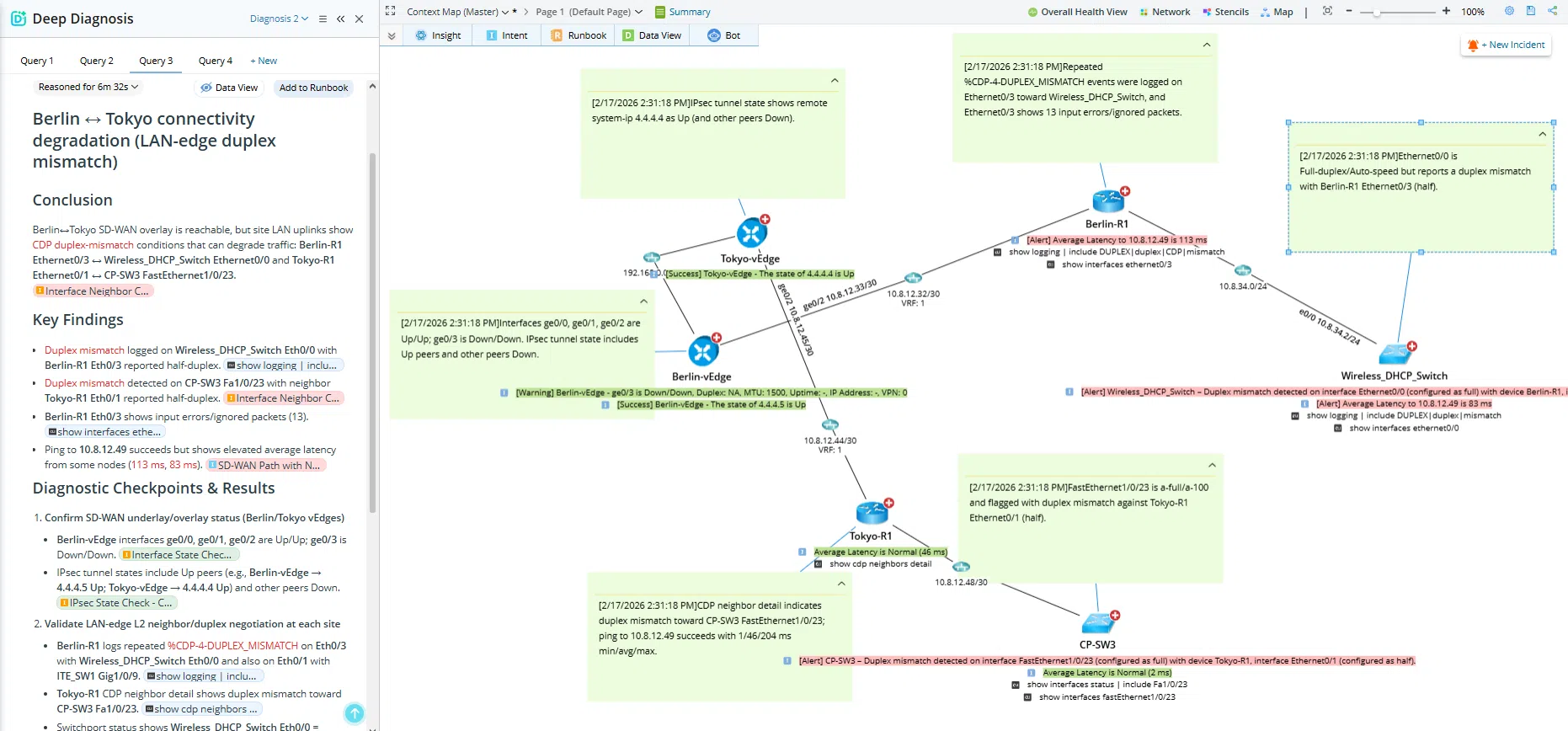
Deep Diagnosis gets a meaningful upgrade in 12.3. It uses an iterative approach where AI can reason through an issue, pull from verified automation sources like runbooks, knowledge docs, and the digital twin, and return a transparent reasoning trail alongside visualized results.
The part that matters most to me is the transparency. AI that shows its work is AI you can actually trust in an operational environment. When an engineer can see the reasoning behind a diagnosis, not just the conclusion, they can validate it, push back on it, or act on it with confidence. That’s a fundamentally different posture than “the AI said this is the problem.”
This is what I mean when I say AI should accelerate engineers, not replace them. Deep Diagnosis in 12.3 is a good example of that done right.
Quick Assessment: bulk validation without the manual overhead
This one is going to land for teams who spend hours doing post change verification or pre change validation manually. Quick Assessment lets you define checks once and run them across similar devices at scale. What used to take hours becomes minutes.
The three use cases that resonate most with me: post mortem analysis to preserve network intent over time, validation before and after changes to make operations safer, and live troubleshooting to quickly narrow down where the problem actually is when time is tight.
If you’ve ever been on a bridge call manually checking device after device trying to isolate an issue, you’ll understand why this matters.
Change Management: remediation with control
This is the one I’d argue is the most operationally significant for mature teams. NetBrain 12.3 strengthens the path from detection to diagnosis to remediation with dual approval flows, centralized change management, and AI assisted impact analysis before execution.
The dual approval model is worth calling out specifically. Changes that are routine and well understood can move fast. Anything touching production that warrants a second set of eyes goes through manual approval. That balance is exactly what teams need when they’re trying to move faster without introducing new risk.
Automation that runs without guardrails is not automation. It’s a liability. NetBrain 12.3 treats that seriously.
Cloud and Kubernetes as actual operational domains
This one is more of a foundation play than an immediate workflow win, but it matters directionally. 12.3 expands cloud services coverage across AWS, Azure, and GCP to over 200 services and introduces Kubernetes operational support including an automation library.
The practical point: consistent intent driven operational workflows across on premises networks, cloud, and Kubernetes without managing them as separate environments. If your team is still treating hybrid infrastructure as three different operational problems, this is the release that starts closing that gap.
What 12.3 Is Not
I want to be direct about this because I think it matters.
NetBrain 12.3 is not a monitoring replacement. If you’re looking for something to replace your existing observability stack, this isn’t it. NetBrain is the automation and intelligence layer that helps you act on what your monitoring already detects, with context, with verification, and with human oversight built in.
It’s also not a magic button. The teams that will get the most out of 12.3 are the ones who have already started building automation into their workflows and are ready to push further. If you’re at the beginning of that journey there’s still value here, but the biggest gains go to teams ready to operationalize it.
My Honest Take
I spent a lot of time with this release. Building the content, understanding the capabilities, thinking through how practitioners would actually use it.
What I came away with is that 12.3 feels like a release built by people who understand where the operational pain actually is. The focus on transparency in AI reasoning, the guardrails in change management, the bulk validation capability, these are not features that exist because they look good in a slide. They exist because they address real friction points that real teams hit every day.
That’s the kind of release worth writing about.
If you’re already running NetBrain and you haven’t dug into R12.3 yet, I’d start with the official release page then Deep Diagnosis and Quick Assessment. Those are the two that I think will change how your team operates most noticeably in the short term.
If you want context on why this matters to network teams right now, start here.